Integrating Shield with Defender iOS
This document provides detailed instructions for integrating Bugsmirror Shield, a feature within Defender iOS, to enhance your application’s binary security. The integration ensures that your iOS app’s binary and string literals are protected against static reverse engineering and unauthorized inspection.
Overview
Bugsmirror Shield is an advanced obfuscation and binary protection technology built into Defender iOS. It works by encrypting sensitive data, relocating string literals, and hardening the Mach-O binary structure to prevent static analysis and tampering.
By integrating Shield with your Defender iOS setup, developers can:
- Encrypt and relocate constant string literals.
- Protect Mach-O sections from disassembly or binary patching.
- Maintain full runtime stability while adding robust static protection.
Pre-requisite Steps:
Before integrating Shield through the Defender iOS workflow, you must prepare your app project to support section relocation.
Follow the steps below carefully to ensure compatibility with the Shield protection process.
Step 1: Enable Section Renaming in Xcode
The Shield obfuscation process requires renaming the constant string section (__cstring) so it can be relocated and protected at build time.
- Open your Xcode project.
- Navigate to: Build Settings → Linking → Other Linker Flags → Release
- Add the following linker flag:
-Wl,-rename_section,__TEXT,__cstring,__DATA,__cstring
Refer to the screenshot below:
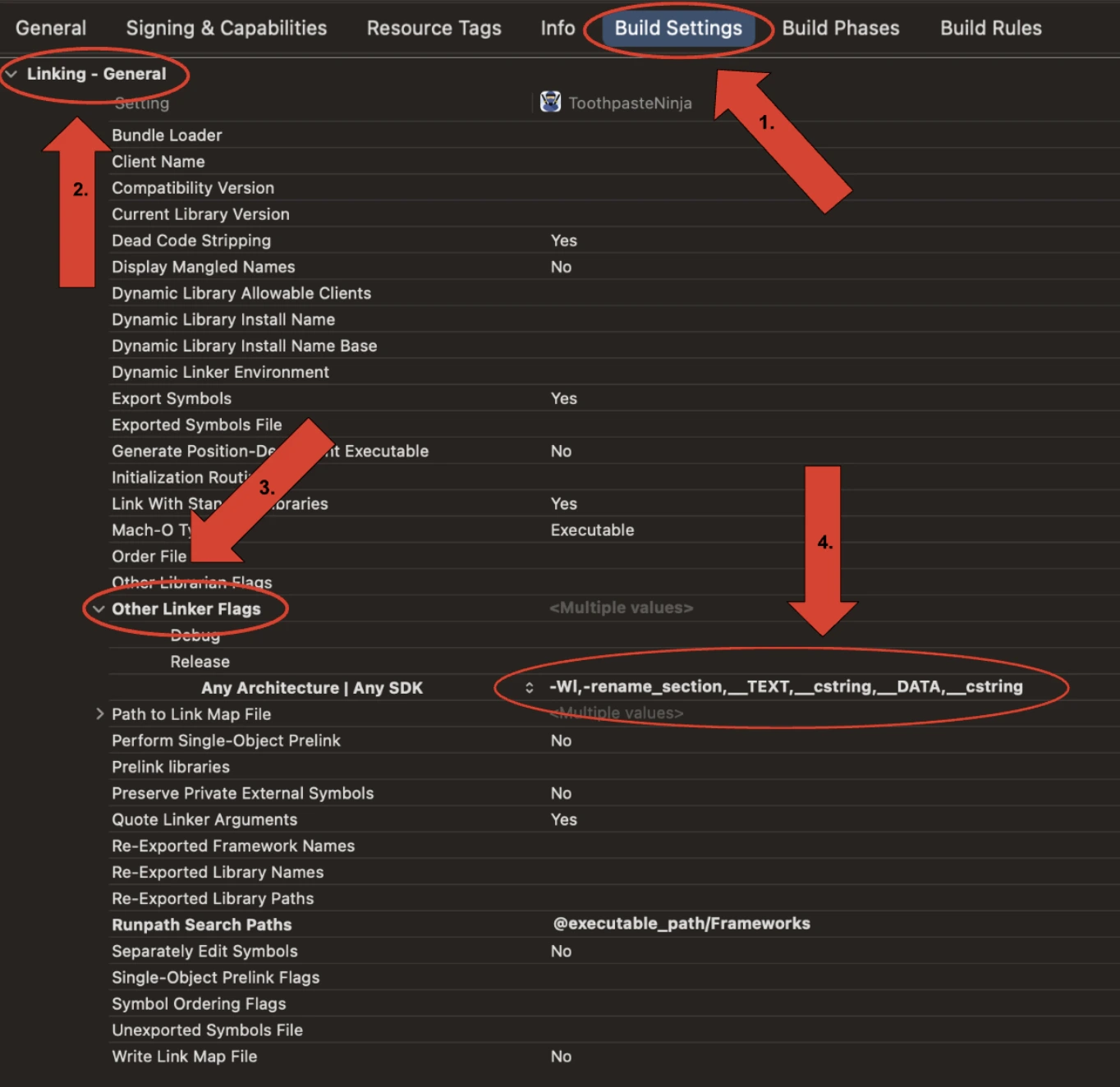
This relocation ensures that Shield can later encrypt and protect these strings during post-processing.
While entering the linker flag, please ensure it is entered on a single line for Shield to work effectively.
Step 2: Build the App in Release Mode
Once the linker flag is added:
- Open Xcode’s scheme selector.
- Choose Product → Archive.
- Wait for the archiving process to complete.
Upon successful build, Xcode will produce an
.xcarchivefile located typically at:
Step 3: Provide the .xcarchive
After the archive is generated:
- Locate the
.xcarchivefile. - Share it with the Bugsmirror Team, or use it directly in the Defender iOS Integrator Tool (if provided).